# Fun with Firefox and sqlite
**URL:** https://forum.codeselfstudy.com/t/fun-with-firefox-and-sqlite/1551
**Category:** General Discussion
**Tags:** sqlite, firefox
**Created:** [March 23, 2019, 1:01am UTC](https://forum.codeselfstudy.com/t/fun-with-firefox-and-sqlite/1551 "2019-03-23T01:01:58Z")
**Posts on this page:** 2
**Page:** 1
### Author:  [@Josh](https://forum.codeselfstudy.com/u/Josh)
#### Post date: [March 23, 2019, 1:01am UTC](https://forum.codeselfstudy.com/t/fun-with-firefox-and-sqlite/1551/1 "2019-03-23T01:01:58Z")
For anyone who wants to practice SQL, Firefox stores a lot of info in sqlite. You can `cd` into [your Firefox profile directory](https://support.mozilla.org/en-US/kb/profiles-where-firefox-stores-user-data#w_how-do-i-find-my-profile) and then load any of the databases in sqlite:
```auto
content-prefs.sqlite
cookies.sqlite
favicons.sqlite
formhistory.sqlite
permissions.sqlite
places.sqlite
storage.sqlite
storage-sync.sqlite
webappsstore.sqlite
```
Example, the browsing history is stored in `places.sqlite`:
```plaintext
$ sqlite3 places.sqlite
```
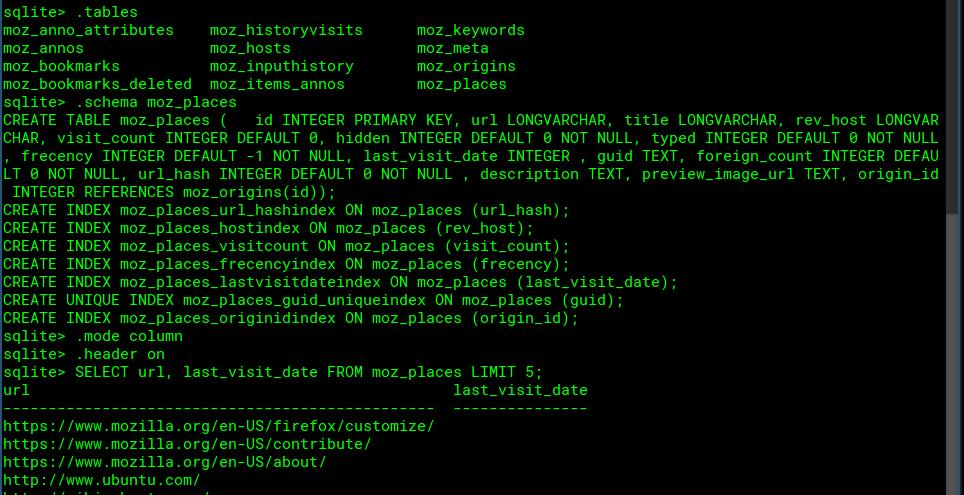
Or for cookies:
```plaintext
$ sqlite3 cookies.sqlite
sqlite> SELECT * FROM moz_cookies LIMIT 10;
```
See also, [this sqlite cheatsheet](https://vicente-hernando.appspot.com/sqlite3-cheat-sheet) and the post below.
> [@How to export data from sqlite to CSV, HTML, text files, and other formats](https://forum.codeselfstudy.com/t/how-to-export-data-from-sqlite-to-csv-html-text-files-and-other-formats/1423):
>
> I learned some quick, useful tips for working with sqlite that people might be interested in. Here’s a quick snippet on how to export query results to CSV format: sqlite\> .mode csv sqlite\> .output my\_data.csv sqlite\> SELECT \* FROM my\_table; sqlite\> .output stdout You can also change the separator with this command: sqlite\> .separator ", " There are more details on section 5 of [this page](https://www.sqlite.org/cli.html). Basically, there are 8 output formats: list – this is the default, pipe separated output csv – comm…
---
### Author:  [@Josh](https://forum.codeselfstudy.com/u/Josh)
#### Post date: [March 23, 2019, 10:00pm UTC](https://forum.codeselfstudy.com/t/fun-with-firefox-and-sqlite/1551/2 "2019-03-23T22:00:04Z")
Here’s an idea for a sqlite/SQL learning project that would be fun:
Write a script to count how many times you search Google (or other search engine) per day and create a report.
The browsing history is stored in a variety of tables. I’m not sure what’s in all of them, but it looked interesting from a quick glance.
```nohighlight
moz_anno_attributes
moz_historyvisits
moz_keywords
moz_annos
moz_host
moz_meta
moz_bookmarks
moz_inputhistory
moz_origins
moz_bookmarks_deleted
moz_items_annos
moz_places
```