# Docker quickstart for people who like Linux
**URL:** https://forum.codeselfstudy.com/t/docker-quickstart-for-people-who-like-linux/2035
**Category:** Operating Systems, Editors, and Tools
**Tags:** gnu, docker, linux
**Created:** [January 11, 2020, 4:37am UTC](https://forum.codeselfstudy.com/t/docker-quickstart-for-people-who-like-linux/2035 "2020-01-11T04:37:33Z")
**Posts on this page:** 3
**Page:** 1
### Author:  [@Josh](https://forum.codeselfstudy.com/u/Josh)
#### Post date: [January 11, 2020, 4:37am UTC](https://forum.codeselfstudy.com/t/docker-quickstart-for-people-who-like-linux/2035/1 "2020-01-11T04:37:33Z")
If anyone out there likes Linux but hasn’t tried [Docker](https://www.docker.com/) yet, it’s a lot of fun.
A few quick examples:
Type this to run [Alpine Linux](https://en.wikipedia.org/wiki/Alpine_Linux) (\< 6 MB):
```plaintext
$ docker container run -it --rm alpine sh
```
You can install packages in Alpine like this: `apk add vim`.
You can also use Docker to run software that isn’t on your computer, like trying Python 3.8 without installing it (112 MB image):
```plaintext
$ docker container run -it --rm python:3.8-alpine sh
```
Docker Hub contains information about each of the Docker images.
> **[python - Official Image | Docker Hub](https://hub.docker.com/_/python)**
>
> Python is an interpreted, interactive, object-oriented, open-source programming language.
Look for the tags section that looks like this:
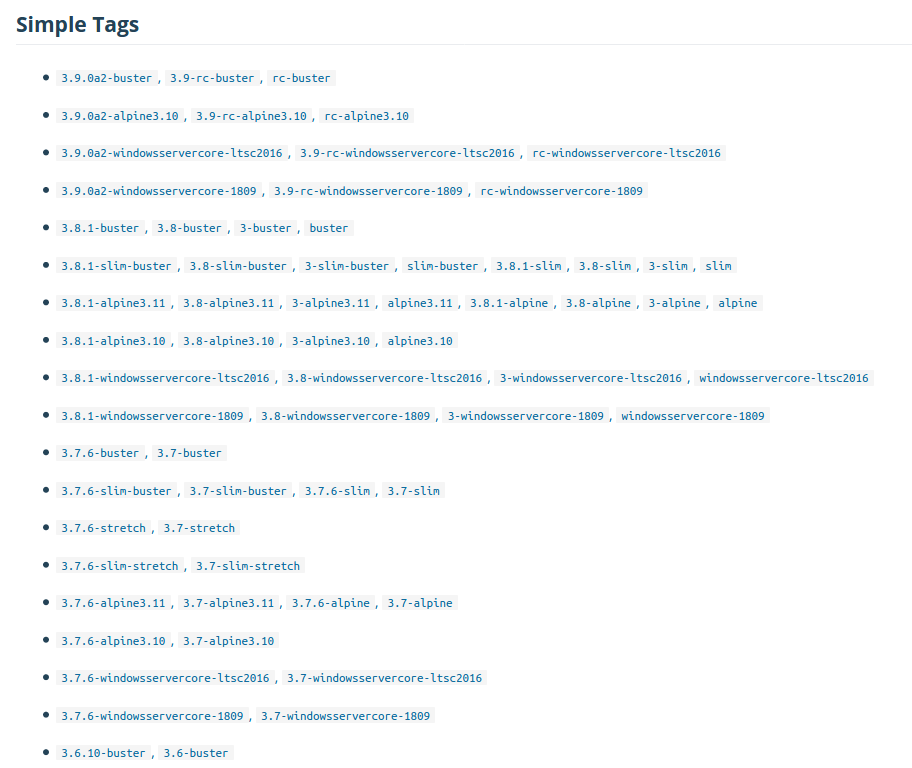
Then append the tag to the image name (in this case `python`). So to run a release candidate for Python 3.9 on Debian 10 (Buster), use this command:
```plaintext
$ docker container run -it --rm python:3.9-rc-buster bash
```
(Alpine Linux doesn’t come with bash, so the command to run there is `sh`. Debian comes with bash, so you can run `bash`.)
It’s worth going through their tutorials, but here’s a quick breakdown of a command to run a disposable container:
```plaintext
$ docker container run -it --rm python:3.9-rc-buster bash
```
| Segment | Meaning |
| --- | --- |
| `docker` | the program |
| `container` | this is for container-related functionality |
| `run` | run a container |
| `-it` | use this for interactive mode |
| `--rm` | remove the container when it stops |
| `python` | the name of the image to use |
| `:3.9-rc-buster` | the tag (version) of the image to use |
| `bash` | the command to run when the container starts |

If you want to mount your current directory inside of the Docker container, use the `-v` (for “volume”) flag. This mounts your local code at `/app` inside of a Python 3.9, Debian 10 container:
```plaintext
$ docker container run -it --rm -v $(pwd):/app python:3.9-rc-buster bash
```
For more learning resources, check out the [official getting started guide](https://docs.docker.com/get-started/), and [this page](https://forum.codeselfstudy.com/t/docker-and-kubernetes-the-complete-guide/2014) (logging in to the forum might be required).
---
### Author:  [@mikeadele](https://forum.codeselfstudy.com/u/mikeadele)
#### Post date: [January 18, 2020, 7:57pm UTC](https://forum.codeselfstudy.com/t/docker-quickstart-for-people-who-like-linux/2035/2 "2020-01-18T19:57:50Z")
I would like to learn more about Linux - (working on a Mac) which route would you recommend?
---
### Author:  [@Josh](https://forum.codeselfstudy.com/u/Josh)
#### Post date: [January 18, 2020, 8:49pm UTC](https://forum.codeselfstudy.com/t/docker-quickstart-for-people-who-like-linux/2035/3 "2020-01-18T20:49:47Z")
Docker is an easy way to run Linux and experiment with it. VirtualBox is another way to run it, if you want a GUI desktop.